
Overview
Welcome to the Ticketure Help Center — your central resource for documentation, training, troubleshooting, and support.
Whether you are setting up events, managing reporting, configuring integrations, or troubleshooting an issue, our Help Center is designed to help you find answers quickly.
If you can’t find what you need, our Ticketure Support team is always available to help.
Getting Started
If this is your first time visiting the Help Center, we recommend completing these steps:
1. Create Your Help Center Account
Many Help Center resources require authentication.
To create your account:
-
Visit the Support Portal
-
Enter your organization email address
-
Create a password
-
Click Sign In
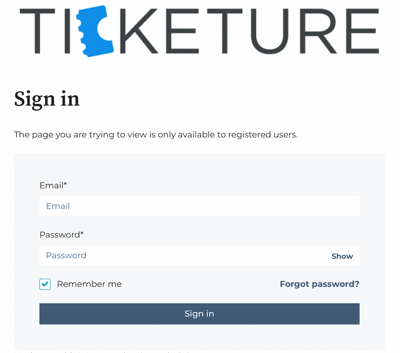
Once logged in, you can:
-
View and track support tickets
-
Access restricted documentation
-
Receive updates on your support requests
If you need assistance creating an account, email:
Quick Links
Use the sections below to quickly find the information you need.
Knowledge Base
Browse step-by-step guides, setup documentation, and troubleshooting articles covering Ticketure features and workflows.
Important: Many articles require authentication. Be sure to log in first to view all available content.
Ticketure Academy
Access video training resources covering:
-
Product onboarding
-
Platform features
-
Best practices
-
New functionality
Reporting
Explore documentation and examples of how to use Kibana reporting to analyze ticket sales, events, and performance.
Integrations
Learn about Ticketure’s third-party integrations, including setup guidance and configuration options.
Salesforce
Access documentation related to Ticketure’s Salesforce integration, including syncing and managing ticketing data.
Before You Submit a Support Request
Many questions can be resolved quickly using our documentation.
Before submitting a ticket, try the following:
-
Search the Knowledge Base
-
Review training videos in Ticketure Academy
-
Check reporting or integration guides
If you still need help, our support team will be happy to assist.
How to Submit a Support Request
There are two ways to contact Ticketure Support.
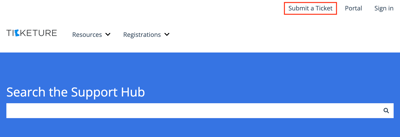
Option 1 — Help Center
-
Navigate to the Help Center
-
Click Submit a Request in the top navigation
-
Fill out the request form
Option 2 — Email Support
You can also contact support directly at:
To help us resolve your request quickly, include:
-
Your tenant (domain)
-
The event(s) affected
-
Steps to reproduce the issue
-
Screenshots or attachments
Support Request Types
Most support requests fall into one of these categories:
General Support
Questions, troubleshooting assistance, or help using Ticketure features.
Web Refinements
Requests for updates or adjustments to your ticketing website, such as copy changes or design update
Feature Requests or Bugs
Suggestions for new functionality or reports of issues that may require review by our Product and Development teams.
For more information on each of these types of request, visit our Understanding Support Request Types page.
Support Hours
Our support team is available:
Monday – Friday
9:00 AM – 5:00 PM (local time)
For urgent issues impacting ticket sales or operations, please follow our Urgent and High Priority Requests guidelines detailed in our Understanding Support Request Types page.
Need help?
If you can’t find the answer you’re looking for, we’re here to help.
Email: support@ticketure.com
Our team will review your request and route it to the appropriate department.