
Accessing Template Context
The template context allows you to view all available data fields that can be referenced when configuring email templates.
To access the context:
-
Navigate to the Order page in the CMS.
-
Select View Tickets.
-
Copy the order URL that is generated.
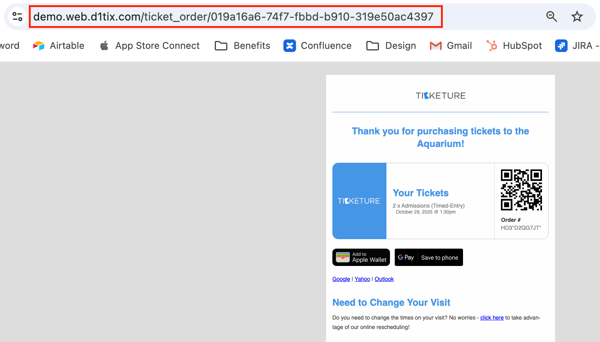
Example order URL:
4. Next, modify the URL by adding /api and /context to view the full context data.
Example:
Opening this link will display the complete JSON structure of available fields that can be used when configuring standard email templates.
Order-Level Fields
ticket_order_id
The unique order ID found in the View Tickets URL.
Example:
019a16a6-74f7-fbbd-b910-319e50ac4397
ticket_order_number
The customer-facing order number associated with the purchase, displayed in the format XXX-XXX-XXXX.
cart_id
The full 32-digit cart ID associated with the order. The cart number shown in the CMS is typically the last 8 digits of this value.
scan_code
Similar to the ticket order number, but formatted with * instead of _.
Example format:
XXX*XXXXXXX*.
qr_code_base64
The Base64-encoded QR code associated with the order.
Purchaser Information
identity_id
The ID associated with the purchaser’s account.
identity_name
The full name of the purchaser.
identity_email
The email address associated with the purchaser.
identity_first_name
The purchaser’s first name.
identity_last_name
The purchaser’s last name.
identity_provider
The authentication provider used for the purchaser’s account.
Identity Metadata
The identity_meta section includes fields collected during checkout.
Available fields may include:
-
address - Purchaser’s address
-
address_more - Additional address information
-
city - City entered at checkout
-
country - Country entered at checkout
-
newsletter - Newsletter opt-in selection
-
phone - Phone number entered at checkout
-
state - State entered at checkout
-
zip_code - ZIP code entered at checkout
Event Templates
event_templates
Contains event-related data for the order.
event_template_id
The unique ID associated with the event (found in the event URL)
event_template_name
The event name
event_template_category
The category assigned to the event
venue_name
The venue name associated with the event
venue_address
The venue address associated with the event
scan_code
Event-specific scan code combining the order scan code and the first 8 digits of the event_template_id, formatted as: XXX*XXXXXXX | XXXXXXXX
qr_code_base64
Event-level QR code
purchased_on
Displays the formatted purchase date and time
Example:
Friday, Feb 20 2026 – 8:49am)]
purchased_on_raw
Displays the raw purchase timestamp and can be used to customize the date format
Example:
2026-02-20T08:49:48-05:00)
Event Sessions
event_sessions
Contains information related to the specific session in the order.
scan_code
Session-specific scan code combining the order scan code and the 8-digit session ID.
Example format:
XXX*XXXXXXX~XXXXXXXX.
The session ID can be found in the event session URL (Event → Session → click the session date/time)
qr_code_base64
Session-level QR code
start_time
Displays the start time of the session
start_datetime
Displays the formatted start date and time
Example:
Tuesday, Mar 10 2026 – 9:00am
start_datetime_raw
Raw session start date/time used to customize display formatting.
Default format:
Monday, 2 January, 2006, 3:04p.m.
end_datetime_raw
Raw session end date/time used for formatting the session end time.
Tickets
tickets
Contains detailed information about individual tickets.
ticket_id
The 32-digit ID associated with the ticket type
scan_code
A 10-digit code visible on the Order ID page beneath each ticket ID
ticket_holder_name
Displays the admit_name entered for the ticket. If none is provided, the purchaser’s name is used
ticket_holder_email
Displays the admit_email entered for the ticket. If none is provided, the purchaser’s email is used
ticket_currency
Currency used to purchase the ticket
valid_from_raw
Raw timestamp for when an admission pass becomes valid
Example:
2026-02-20T08:48:41-05:00
valid_to_raw
Raw timestamp for when an admission pass expires
Example:
2027-02-28T23:59:59-05:00
state
Ticket status. Possible values include:
-
booked – Purchased but not yet redeemed
-
redeemed – Ticket has been scanned or force redeemed
-
void – Ticket has been invalidated
-
cancelled – Ticket was refunded
ticket_type_name
Ticket type name as configured in the event
ticket_group_name
Ticket group name
handler
The ticket category type (for example: tickets, codes, passes, membership).
qr_code_base64
Ticket QR code
ticket_price
Base price of the ticket
ticket_adjusted_price
Ticket price after discounts are applied
valid_from
Formatted start date/time for admission pass validity
Example:
"Friday, Feb 20 2026 - 8:48am"
valid_to
Formatted expiration date/time for admission pass validity
Example:
"Sunday, Feb 28 2027 - 11:59pm"
ticket_group_meta
Metadata fields configured on the ticket group that can be displayed in the email template.
Tickets Summary
tickets_summary
A summary of ticket types in the order.
count
Number of tickets per ticket type (not the total ticket count)
ticket_type_name
Ticket type included in the order
ticket_group_name
Ticket group name
currency
Currency used in the order
single_price
Price of a single ticket
single_adjusted_price
Price of a single ticket after discounts
row_price
Total price of all tickets in that row
row_adjusted_price
Total discounted price of all tickets in that row
Event Template Metadata
event_template_meta
Allows event metadata to be pulled into templates.
Image-related fields include:
-
image_cover
-
image_cover:dimensions
-
image_cover_alt_text
-
image_cover_no_cropping
-
image_profile
-
image_profile_alt_text
-
image_profile_no_cropping
-
profile_image:dimensions
additional_info
Displays responses to survey questions configured for the event.
Pricing Fields
before_adjustments_prvice
Total order price before discounts.
total_adjustments
Total discount amount applied.
before_fees_price
Order price before fees.
total_outside_fees
Total additional fees
total_price
Total order price. If multiple events are included in the order and separate emails are sent, this value reflects the price for that specific event.
total_payments
Total amount paid for the order.
Portal Information
portal
name
Portal name
domain
Portal domain
slug
User-friendly identifier configured during onboarding
Seller Information
seller
name
Seller name
slug
Seller slug configured in the CMS
meta
Seller metadata available for use in templates
Payment Gateway
gateway
name
Payment gateway used for the order
receipt
Gateway receipt information
Payment Details
payments
ccured_on_raw
Raw timestamp of the payment event (customizable for formatting)
name
Payment method name
action
Payment action (capture or refund)
amount
Payment amount
identifier
Payment identifier
Discounts
discounts
Displays checkout rules or discount codes applied to the order..
Membership Fields
Additional fields available for membership orders.
membership
scan_code
Member ID
expiry_raw
Raw membership expiration date
Example:
2027-02-28T23:59:59-05:00
role
Membership role configured in the CMS
program
Membership event name
auto-renew_on
Indicates whether auto-renew is enabled (true or false)
from_auto_renew
Indicates if the membership originated from auto-renew
qr_code_base64
Membership QR code.
Programs
Displays membership program history.
Fields include:
-
program - Membership event name
-
expiry_raw - Membership expiration date
-
role - Membership role
-
auto_renew_on - Indicates if auto-renew is enabled
Context
Indicates the type of template context being used.
Common values include:
-
order_context
-
cart_context
Tip: When building templates, referencing the /context endpoint is the best way to confirm exactly which fields are available for that order or event configuration.
For more information or questions about Standard Password Context Output, please email support@ticketure.com.