
Overview
Ticketure helps protect your Point of Sale (POS) system by checking that only approved physical devices can access it. This process runs automatically in the background and helps ensure that devices connecting to the POS are legitimate and secure.
Note: This feature requires at least v5.3 of the POS and iOS18 or higher.
Configuration
Enabling Device Management
To use this feature, Enable Device Management must be turned on in the CMS settings.
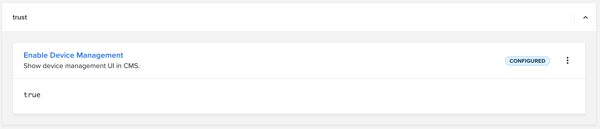
When enabled:
-
Users are asked to name the device when logging in to the POS.
-
A POS Devices page becomes available in the CMS where devices can be viewed and managed.
When disabled:
-
Device names are not requested.
-
The POS Devices page is hidden.
Note: Devices will still be registered when users log in to the POS, even if this setting is turned off.
Using Device Management in the POS
When a user logs in to the POS, the system automatically checks the device. No action is required from the user.
All devices start in an “Unconfirmed” state until they are reviewed.
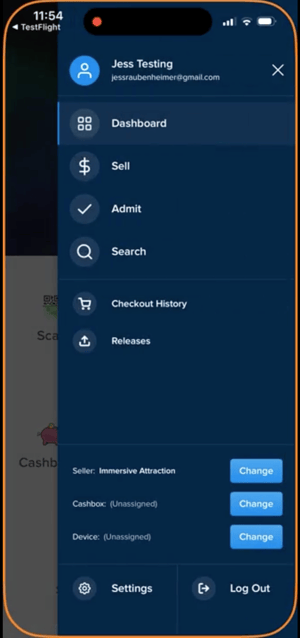
Users can rename a device directly in the POS by opening the menu in the top-right corner of the seller page and selecting “Change” next to Device.
If a device is blocked, the user will see an error message the next time they try to log in.
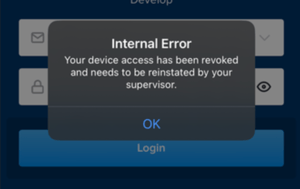
Note: Blocking a device will not log a user out during an active session. It only affects future login attempts.
Managing Devices in the CMS
Devices can be managed in the CMS at both the portal and seller levels.
From the POS Devices page, authorized users can:
-
View all registered devices
-
Mark devices as Trusted or Revoked
-
Update device names

At the seller level, only devices linked to that seller are shown.
Note: This view is available only to users with seller-admin access.
For more information or questions about Queue-It, please email support@ticketure.com.