
Overview
POS users can now adjust open cashboxes to record cash in and cash out transactions. During this process, the session remains active, the balance updates in real time, and a receipt prints at the POS. Each adjustment is logged and reflected in the CMS.
Configuration
Permissions
To use this feature, staff must have one of the following roles: Portal Admin, Seller Admin, or Manage Cash.
Even with one of these roles, a secondary authorization step is required to complete an adjustment. After the user selects a cashbox and specifies whether the action is a cash in or cash out, a pop-up window will prompt them to authorize the action using either:
- Email address and password, or
- PIN
Set Up
Once authorization is confirmed:
- Enter the amount being added to or removed from the till.
- Select an adjustment reason.
- Confirm the cash in (or cash out).
If an Epson printer is connected, a receipt will print automatically once the adjustment is complete. The session report will update to reflect the new totals.
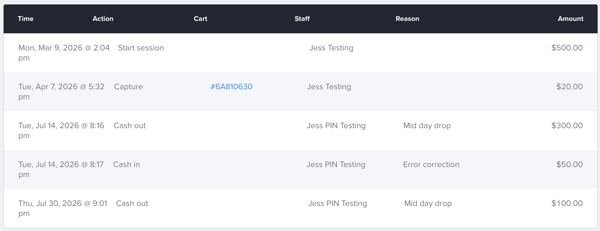
In the CMS, users can view a record of each adjustment, including:
- The action performed (cash in or cash out)
- The staff member who performed the action
- The adjustment reason
- The adjustment amount
For more information or questions about cashbox adjustments, please email support@ticketure.com.