
Accessing Cart Template Context
The template context allows you to view all available data fields that can be referenced when configuring email templates.
To access the context:
-
Navigate to the Order page in the CMS.
-
Select View Tickets.
-
Copy the order URL that is generated.
Example: https://demo.web.d1tix.com/cart/f1202584-e391-f185-d27b-b83d485c0190
4. Next grab the domain name from the CMS, and replace the domain name in the URL
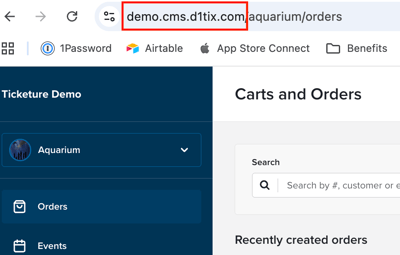
Example: https://demo.cms.d1tix.com/cart/f1202584-e391-f185-d27b-b83d485c0190
5. Then, modify the URL by adding /api and /context to view the full context data.
Example: https://demo.cms.d1tix.com/api/cart/f1202584-e391-f185-d27b-b83d485c0190/context
Opening this link will display the complete JSON structure of available fields that can be used when configuring cart email templates.
Cart-Level Fields
cart
id
The unique order ID found in the View Invoice URL.
number
The customer-facing order number associated with the cart.
state
Cart status. Possible values include:
- booked - Cart paid in full
- pending - Cart has an outstanding balance
- expired - Cart has past expiry date
Pricing Fields
totals
currency
Currency used to pay the invoice.
face_value
Price of a single ticket.
adjustments
Discount total.
adjusted_value
Price of a single ticket after discounts.
inside_percent_fees
Total inside purchase percentage fees.
inside_fixed_fees
Total inside purchase fixed fees.
outside_percent_fees
Total outside purchase percentage fees.
outside_fixed_fees
Total outside purchase fixed fees.
price
Total cart price.
payments
Total payments made for cart.
scheduled_payments
Total amount of schedule payments set for cart.
unpaid
Total amount due on the cart,
Payments
action
Payment action (capture or refund)
amount
Payment amount
identifier
Payment identifier
method
Payment method
name
Payment name
occurred_on
Displays the formatted date and time the cart was created
occurred_on_raw
Raw timestamp of the cart event (customizable for formatting)
Purchaser Information
identity
The email address associated with the purchaser.
id
The ID associated with the purchaser’s account.
The meta section includes fields collected during cart creation.
Available fields may include:
-
address - Purchaser’s address
-
city - City associated with purchaser's account
-
country - Country associated with purchaser's account
-
newsletter - Newsletter opt-in selection
-
state - State associated with purchaser's account
-
zip_code - ZIP code associated with purchaser's account
name
The full name of the purchaser.
Event Templates
name
The event name.
category
The category assigned to the event.
Event Sessions
end_datetime_raw
Raw session end date/time used to customize display formatting.
start_datetime
Displays the formatted start date and time.
start_datetime_raw
Raw session start date/time used to customize display formatting.
Tickets
count
Number of tickets per ticket type (not the total ticket count).
currency
Currency used in the cart.
row_adjusted_price
Total discounted price of all tickets in that row.
row_price
Total price of all tickets in that row.
single_adjusted_price
Price of a single ticket after discounts.
single_price
Price of a single ticket.
Ticket Group
ticket_group
name
Ticket group name.
description
Ticket group description.
Ticket Type
ticket_type
name
Ticket type name.
description
Ticket type description.
Identity Metadata
meta
Allows event metadata to be pulled into templates. Image-related fields include:
-
image_cover
-
image_cover:dimensions
-
image_profile
-
profile_image:dimensions
Venue
venue
name
The venue name associated with the event
address
The venue address associated with the event
Cartmods
Portal Information
portal
name
Portal name
domain
Portal domain
slug
Portal slug
Seller Information
name
Seller name
slug
Seller slug
Scheduled Payments
scheduled_payments
amount
Total amount of scheduled payment due
due
Raw scheduled payment date/time used to customize display formatting.
note
Context
Indicates the type of template context being used.
Common values include:
-
order_context
-
cart_context
For more information or questions about Cart Template Context Output, please email support@ticketure.com.